Simplifying data analysis: how the Kommo and Looker integration helps visualize sales
The Kommo and Looker integration is a step that can significantly simplify data analysis and sales visualization. Let us explore how it works and what benefits you can get from this integration.
First, Kommo — previously known as amoCRM — provides powerful tools for customer relationship management. It helps collect data on sales, customer interactions, and much more. However, once data is collected, a question arises: how do you analyze it? This is where Looker comes in. It is a business intelligence platform that allows you to visualize data and make it more accessible. Integrating these two systems enables you not only to collect data but to transform it into clear reports and dashboards.
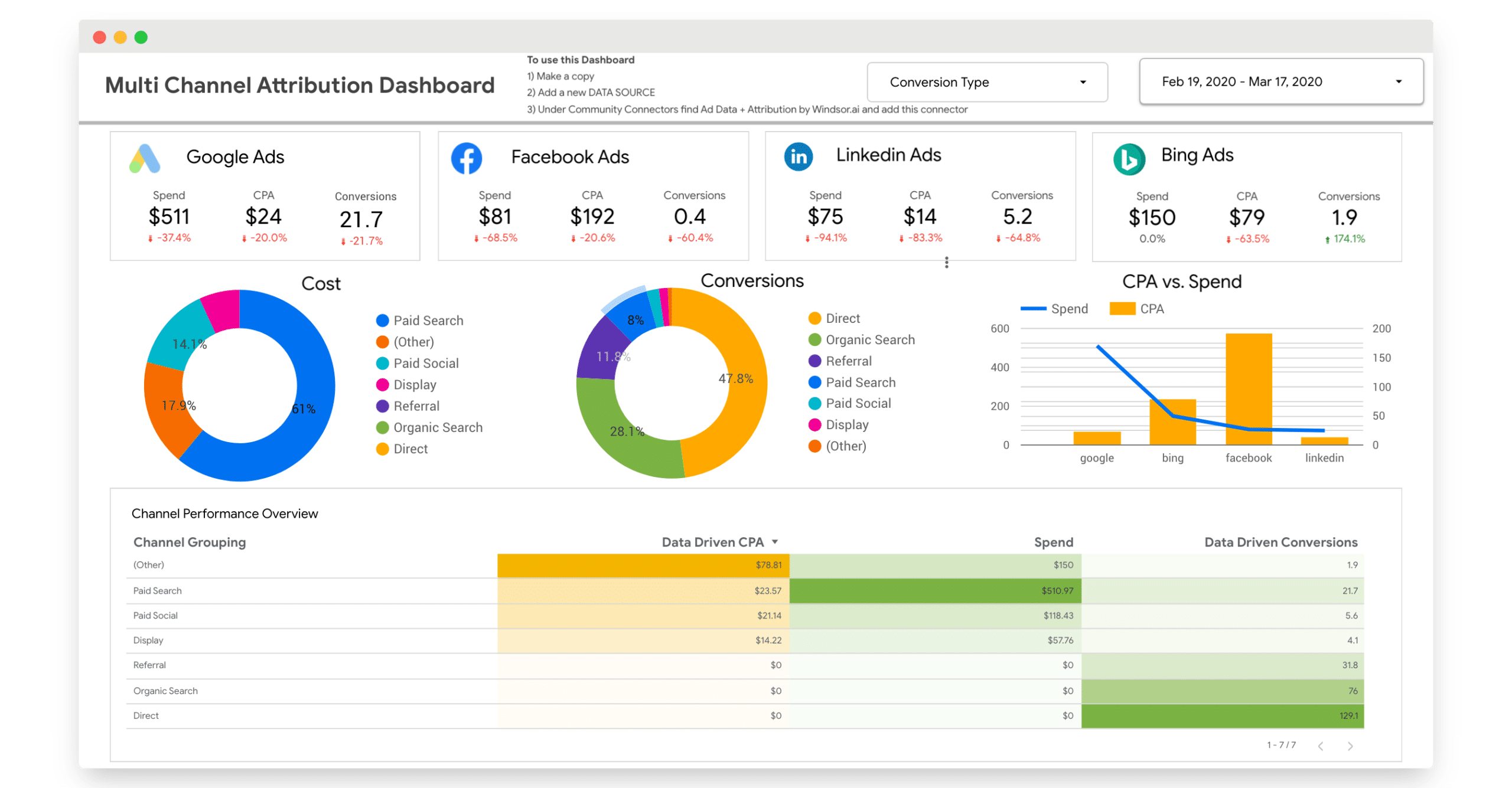
When you integrate Kommo with Looker, you gain the ability to track key performance indicators in real time. For example, you can see how your sales compare to previous periods, which products are most popular, and which sales channels generate the most revenue. This allows you to make better-informed decisions and respond quickly to market changes. Additionally, data visualization helps the team better understand what is happening in the business and collaborate more effectively.
It is worth noting that the Kommo and Looker integration process is quite straightforward. You do not need to be a technical expert to set up this connection. Step-by-step guides and support are available at every stage. Once configured, you can easily import data from Kommo into Looker and start building your own reports. This means you can focus on analysis rather than on collecting data.
Furthermore, the integration allows you to customize dashboards to your specific needs. You can choose which metrics matter to you and visualize them in the way that works best. This gives you the ability not only to track current indicators but also to forecast future results. For example, you can analyze trends and draw conclusions about how demand for your products will change. This is especially useful for planning and strategy development.
It is also worth remembering that the Kommo and Looker integration improves collaboration between teams. When all team members have access to the same data and reports, it fosters more effective cooperation. Sales, marketing, and analytics teams can work together based on the same facts, significantly boosting overall productivity.
Step-by-step guide to Kommo and Looker integration: setup and optimization
The first step in the integration is creating accounts in both services if you do not already have them. Make sure you have access to the Kommo API, as this is the key element for the integration. Once you have registered and obtained the necessary API keys, you can move to the next step. It is important to remember that correct API setup is the foundation of a successful integration, so pay special attention to this part.
Now that you have API access, the next step is setting up the connection between Kommo and Looker. To do this you will need to use Looker’s dedicated interface for connecting external data sources. In this process you will need to enter your Kommo API credentials so that Looker can access the required information. Make sure all data loads correctly before moving forward.
Once the connection is established, you can start configuring data models in Looker. This is an important stage, as this is where you define which data from Kommo will be used for analysis. You can select various metrics such as number of deals, conversion rates, and other key indicators that will help you better understand your customer base. Correctly configured data models will allow you to generate more accurate and useful reports.
With data models in place, you can move on to creating visualizations. Looker offers a wide range of tools for building charts and graphs that help present data clearly. This can be especially useful for presentations or reports to management. Do not hesitate to experiment with different visualization types to find the one that best suits your needs.
After creating the necessary visualizations, it is important not to forget about regular data refresh. Make sure the integration is working correctly and that data from Kommo is updating in Looker in real time. This will ensure you always have current information for decision-making. If you notice any data refresh issues, do not delay in resolving them, as this can affect the quality of your reports.
Examples of successful Kommo and Looker integration use in business
Let us talk about how companies can use the integration to improve their sales. For example, one e-commerce company integrated Kommo with Looker to track the effectiveness of its advertising campaigns. Using Looker they were able to visualize sales and conversion data, which allowed them to quickly identify which channels generate the most revenue. This in turn enabled them to optimize the advertising budget and focus on the most effective strategies. As a result, the integration not only helped save money but also significantly increased revenue.
In addition, the Kommo and Looker integration can be useful for analyzing customer experience. For example, one service company used this integration to monitor customer reviews and their interactions with products. Using Looker they were able to create dashboards that showed how customers rate their services in real time. This enabled them to respond quickly to negative feedback and make adjustments to their offerings. As a result, customer satisfaction levels rose significantly, which of course had a positive impact on the company’s reputation.
It is also worth mentioning how the integration can help with team management. For example, one IT company used Kommo to manage tasks and projects, and Looker for employee performance analysis. With the integration they were able to create reports showing how quickly and effectively the team completed its tasks. This allowed management to identify the strengths and weaknesses of each employee and accordingly offer individual development plans. As a result, the team worked more cohesively and productivity increased.
It is also worth noting that the Kommo and Looker integration can be useful for forecasting future trends. For example, one retail company used data from Kommo to analyze purchasing behavior and build forecasts based on historical data. Using Looker they were able to visualize these forecasts and present them in a convenient format for decision-making. This enabled them to prepare for market changes in advance and adapt their strategies.
Thus, the Kommo and Looker integration provides businesses with powerful tools for analyzing and optimizing various processes. From improving sales effectiveness to enhancing customer experience — the possibilities are extensive. If you have not yet taken advantage of this integration, now may be the right time to consider how it can help your business reach new heights.