
Step-by-step guide to integrating Kommo and Google Data Studio.
Integrating Kommo with Google Data Studio is an effective way to enhance data analysis and visualization, helping you make more informed business decisions. If you already use Kommo (formerly known as amoCRM) to manage your clients and sales, adding Google Data Studio to your workflow can significantly improve your team’s efficiency. Let’s walk through this process step by step.
First, make sure you have access to both tools. If you haven’t yet registered with Google Data Studio, simply visit the site and create an account — it only takes a few minutes. Then confirm that you have an active Kommo account. If you’re already using the platform, you’re in good shape.
Now that you have access to both services, the next step is creating a connection between them. To do this, you’ll need to use the Kommo API. Don’t be intimidated if you’re unfamiliar with programming — it’s actually quite straightforward. You’ll need to obtain an API key from your Kommo account. Go to your account settings and find the API section. Copy the key — you’ll need it shortly.
Once you have the API key, open Google Data Studio and create a new report. Within that report you can add various data sources. To integrate with Kommo, select “Add a data source” and then choose “API connection.” You’ll be prompted to enter your API key. Enter it and click “Connect.”
With Kommo connected, you can now select which data you want to import into Google Data Studio — information about contacts, deals, tasks, and more. Select the required fields and click “Add to report.” This lets you visualize the data in whatever format suits you best.
Once the data is loaded, you can start building your visualizations. Google Data Studio offers a rich set of tools for creating charts, tables, and diagrams. You can configure them to display exactly the information you need. For example, you might build a chart showing sales trends over a given period, or a table highlighting your most active clients.
Keep in mind that Google Data Studio lets you share reports with your team. Everyone can see up-to-date data and make decisions based on a single source of truth. You can configure access permissions for different users so that each person sees only the information relevant to them.
Examples of visualizing Kommo data in Google Data Studio.
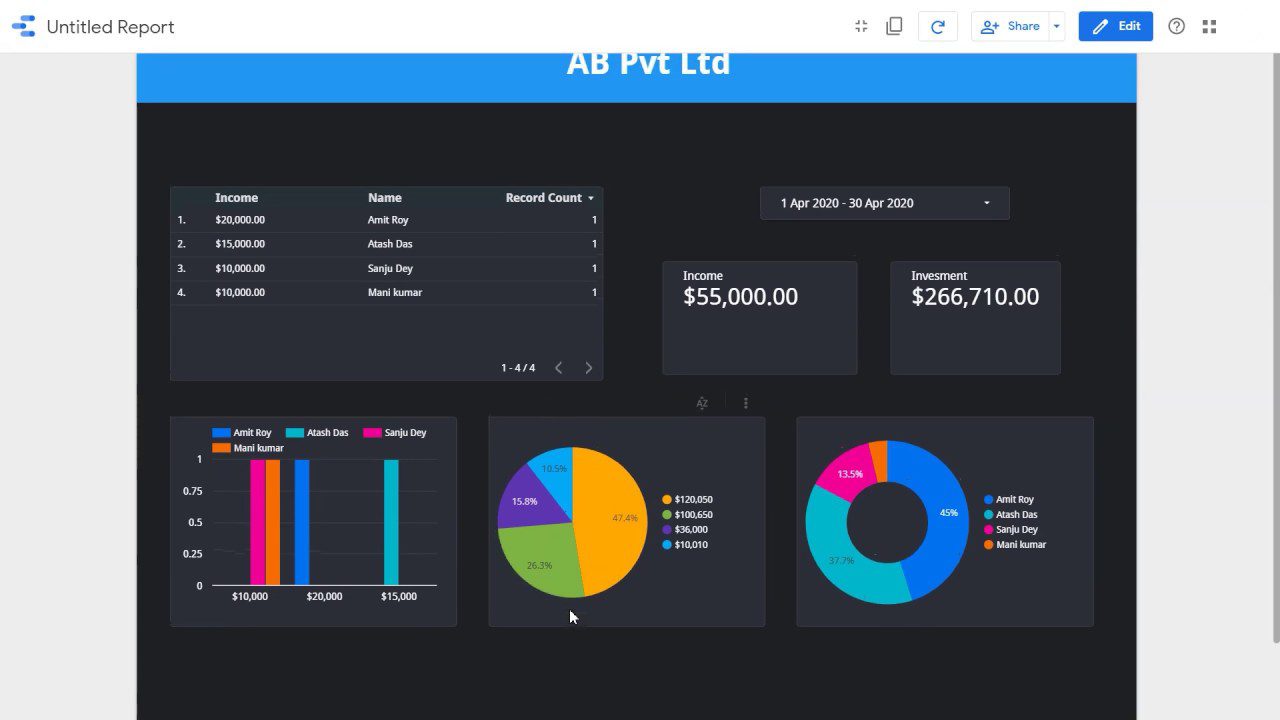
The integration of Kommo and Google Data Studio opens up a wide range of data visualization possibilities. If you already use Kommo to manage clients and sales, you understand how important it is to have access to analytics that support informed decision-making. In this context, Google Data Studio becomes a powerful tool for transforming your data into clear, actionable reports.
The integration of these two platforms lets you extract data from Kommo and present it as interactive dashboards. This is especially useful when you need to track key performance indicators — such as deal volume, pipeline conversion rates, or manager activity. For example, you can build a dashboard showing how many deals were closed in a given period and how that compares against your targets. This not only gives you the big picture but also enables quick responses to changes.
Google Data Studio’s visualization options include a variety of chart and diagram types, making information easier to interpret. You can use pie charts to show market share, line charts to analyze sales trends, or bar charts to compare results across teams. All of this helps both you and your colleagues better understand how the business is performing.
The Kommo–Google Data Studio integration also allows you to tailor reports to your specific needs. You can choose exactly what data to display and how to present it. If you want to analyze the performance of marketing campaigns, for instance, you can build a dedicated report showing which channels bring in the most clients and which need improvement. This gives you the ability not just to track current results, but also to plan future actions.
Sharing reports with colleagues is another advantage. You can grant access so that other team members can contribute edits or comments. This creates a more transparent working environment and supports better collaboration. Every team member can access up-to-date information at any time and make data-driven decisions.
Benefits of using the Kommo and Google Data Studio integration.
One of the primary advantages of the integration is the ability to create clear, compelling reports. With Google Data Studio you can easily transform raw Kommo data into informative charts and diagrams. This simplifies how information is perceived and makes it faster to identify key trends and patterns. You can see which products are in highest demand, or analyze at what time of day sales peak. Data visualization supports not just analysis, but also forward-looking strategy.
The integration also automates the data update process. You no longer need to manually collect information from Kommo and upload it to Google Data Studio. All updates happen automatically, saving time and reducing the risk of errors. This is especially valuable for companies handling large volumes of data who need timely information to make operational decisions. You can focus on higher-priority work knowing that your reports are always current.
Collaboration is another significant benefit. Google Data Studio makes it easy to share reports with colleagues and partners. You can provide access so that other team members can make changes or add comments, creating a more transparent environment and promoting more effective teamwork. As a result, your organization can respond to changes more quickly and make better-grounded decisions.
The integration also helps deepen your understanding of customers. Detailed reports allow you to analyze client behavior, preferences, and needs more thoroughly. This in turn allows you to adapt your offerings and improve service quality. The better you understand your clients, the more likely they are to stay with you long-term.
Frequently asked questions about the Kommo and Google Data Studio integration
One common question is how often data is updated in Google Data Studio. Data is typically refreshed automatically, but you can configure the update frequency based on your needs, ensuring you always have current information at hand.
Another frequently raised question concerns data security. Many users worry about how their data is protected during integration. Both Kommo and Google Data Studio take data security seriously. Using the API, you can be confident that your data is transmitted securely and protected from unauthorized access.
If you encounter any difficulties with the integration, you can always reach out to our agency. At Exceltic, we’re ready to help you at every step of the process and answer any questions that arise. Don’t hesitate to ask — getting clarity up front will help you integrate faster and start realizing the value of your data analysis sooner.