Fireflies.ai records meetings, transcribes them, and generates AI summaries with action items, topics, and sentiment analysis. Kommo manages the sales pipeline. The logical scenario: a client meeting ends — the transcript, summary, and action item tasks automatically appear in the lead card. No manual note copying, no lost context. There is no native integration between Fireflies.ai and Kommo. Zapier and Make pass data as flat text, losing structure. Here is how to solve this correctly.
Why no native integration exists
Fireflies.ai does not have Kommo in its list of native CRM integrations. Fireflies’ official CRM connectors are HubSpot, Salesforce, Pipedrive, and Zoho. For all other systems, Fireflies offers a Webhook or synchronization via Make and Zapier.
This means the only “ready-made” options for Kommo are intermediaries:
- Zapier/Make: basic
Transcription completedtrigger → create a note in Kommo - Default sync: cycle every 3 hours — data appears with a delay
- Webhook via Make: real-time, but only basic text transfer
None of these options solve the main challenge — passing structured AI data into the right fields of the lead card.
What is lost when passing through Zapier and Make
The Fireflies Webhook returns a rich, structured payload after each meeting:
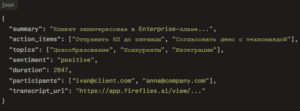
Zapier and Make receive this JSON and pass it to Kommo as flat text in a single note field. The structure is completely lost:
- ❌
action_items— end up in the note text instead of creating Tasks in Kommo - ❌
topics— lost or dumped into text - ❌
sentiment— not recorded in a custom lead field - ❌
duration— not captured as a separate field - ❌
participants— not used for contact identification - ❌ No conditional logic — all meetings are processed the same way regardless of content
Why a custom integration is better than Zapier and Make
Structured data instead of flat text
A custom integration parses the JSON payload and maps each element to the right place in Kommo: summary → formatted note, action items → Tasks with deadlines, sentiment → custom lead field, topics → contact tags, duration → “Meeting Duration” field, transcript link → “Meeting Recording” field.
Conditional processing logic
Zapier and Make support only a linear trigger without branching. A custom integration applies rules:
- If
sentiment = negative→ create a Task for the manager: “Requires attention — negative meeting” - If
duration < 600 seconds→ do not create a note (technical or accidental call) - If a meeting participant has a new email → create a new contact in Kommo and link to the lead
- If
topicscontains “Competitors” → tag the lead withCompetitive deal - If
topicscontains “Pricing” → update the lead stage to “Price Negotiation”
Reliable lead identification
The most common problem in a Zapier connection is finding the right lead in Kommo for a specific meeting. Zapier searches only by participant email. If one contact has multiple leads — the note goes to a random one or creates a duplicate.
A custom integration uses multi-level identification: participant email + active lead at a specific stage + recent activity time window. If no match is found — a new lead is created with a source tag.
Cost at scale
Zapier and Make charge per event — as the team and meeting count grow, the cost rises linearly. 500 meetings per month on Zapier is an additional $100–200/month on top of Fireflies and Kommo costs. A custom integration is a one-time investment with no variable costs.
Reliability and idempotency
Zapier does not guarantee exactly-once delivery — repeated webhook delivery creates a duplicate note in the lead card. A custom integration uses idempotency keys based on Fireflies meeting_id — each meeting is processed exactly once.
What the Exceltic.dev custom integration solves
- AI summary in note — a structured meeting summary automatically appears in the lead card with formatting: Overview, key topics, next steps
- Action items → Tasks in Kommo — each action item from the meeting creates a Task in the lead card with a deadline and assignment to the responsible manager
- Sentiment → custom field — meeting tone (positive, neutral, negative) is written to a custom lead field and used for segmentation and prioritization
- Topics → tags — meeting topics (pricing, competitors, integrations, support) are automatically added as tags to the lead and contact
- Transcript link — a direct link to the full transcript in Fireflies is recorded in a custom field of the lead card — the manager opens it in one click
- Meeting duration — captured in a custom field for analytics: average meeting length by pipeline stage
- Automatic contact creation — new meeting participants not found in Kommo are created as contacts and linked to the lead
- Conditional stage change — based on meeting topics, the lead automatically moves to the next stage: pricing discussion → “Negotiation” stage, contract mention → “Contract” stage
- Meeting filtering — only client meetings are synchronized to Kommo; internal meetings, recruiting calls, and personal meetings are filtered by participant domain or event name
How the integration works — technical process
Connection architecture
The integration is built on the Fireflies.ai Webhook → Exceltic middleware → Kommo API v4 stack. After the recording is processed, Fireflies sends a Transcription completed webhook with the full meeting payload. Authentication with Fireflies is via API Key in the request header. Authentication with Kommo is via OAuth2 Long-lived Token.
Step-by-step scenario: client meeting completed
- Meeting in Zoom/Google Meet/Teams ends — Fireflies processes the recording
- After 10–20 minutes, Fireflies sends the
Transcription completedwebhook - Middleware verifies the request and parses the payload
- Filtering: participant domains are checked — if all participants are internal (
@company.com) → the meeting is skipped - Lead identification: search in Kommo by the external participant’s email:
GET /api/v4/contacts?query={email} - Find the active lead associated with the found contact:
GET /api/v4/leads?contact_id={id}&status=active - If lead found — a formatted note is created:
POST /api/v4/leads/{id}/notes - Tasks are created from
action_items:POST /api/v4/taskswith deadline +2 business days - Custom lead fields are updated: sentiment, topics, meeting duration, transcript URL:
PATCH /api/v4/leads/{id} - Tags are applied based on
topics:POST /api/v4/leads/{id}/tags - Conditional stage change rules are applied if
topicscontains trigger topics - If the external participant is not found in Kommo — a new contact and lead are created with the tag
New from Fireflies
Summary format in the lead card
text
📋 MEETING: Demo Call with John Smith (TechCorp) 📅 March 25, 2026 | ⏱ 47 minutes | 😊 Positive OVERVIEW The client is interested in the Enterprise plan. Main questions about integration with their ERP system and SLA. 🎯 TOPICS Pricing · Integrations · SLA · Competitors ✅ ACTION ITEMS → Send Enterprise pricing proposal [by March 27] → Schedule a technical call with their IT team → Prepare a competitor comparison 🔗 Full transcript: [open in Fireflies]
What happens on error
If the Kommo API is unavailable at the time the webhook is received — the event is saved to a queue with exponential backoff. Retries are executed until successful delivery. The middleware uses the Fireflies meeting_id as an idempotency key — a meeting is processed exactly once even on repeated webhook delivery.
Real-world case
Consulting company, 5 sales managers, ~60 client meetings per month.
Managers conducted demo and discovery calls in Zoom with Fireflies. After each meeting, key moments had to be manually transferred to Kommo: open the transcript in Fireflies, read the summary, copy action items, create Tasks in Kommo, add a note. This took 10–15 minutes after each meeting. With 12–15 meetings per week — 2–3 hours of weekly routine per manager.
An additional problem: some managers skipped the note transfer during high load. The team lead did not see meeting context in Kommo — only pipeline stages with no understanding of what was happening inside the deal.
After connecting the custom integration: within 15 minutes of each meeting, a formatted summary appears in the lead card, Tasks from action items are created and assigned, and the Competitive deal tag is automatically added if the client mentioned competitors.
Result: 2–3 hours per week returned to each manager, the team lead sees context for all meetings in Kommo without switching to Fireflies, 0 lost action items.
Which businesses benefit most
The integration is most relevant for service companies and B2B sales teams with active meeting schedules — consulting, IT sales, agencies — where the quality of transferring meeting context to CRM directly affects deal closing speed.
Especially valuable for teams with remote managers or multiple time zones — when the team lead is not physically present at meetings and the only source of information about deal progress is the Kommo card.
Frequently asked questions
Why is there no native Fireflies.ai and Kommo integration?
Fireflies.ai supports native integrations only with the largest CRM platforms: HubSpot, Salesforce, Pipedrive, Zoho. Kommo is not on this list. For all other systems, Fireflies provides a Webhook API — the Exceltic.dev custom integration uses exactly this to pass the full meeting data structure.
Does the integration work with all meeting platforms?
Yes. Fireflies.ai supports auto-recording for Zoom, Google Meet, Microsoft Teams, Webex, and other platforms. The Kommo integration works regardless of the meeting platform — data is passed via the Fireflies Webhook after any recording finishes processing.
How does the integration determine which lead in Kommo the meeting belongs to?
The middleware searches for a lead by the external meeting participant’s email. If one active lead is found — data is written to it. If multiple active leads — the lead with the most recent activity is used. If no lead is found — a new contact and lead are created with the tag New from Fireflies for manual review by the manager.
Can internal meetings be excluded from synchronization?
Yes. A filter by participant domains can be configured: if all participants have a corporate domain — the meeting is not synchronized to Kommo. Additionally, filtering by event name can be configured: meetings containing “Internal”, “Team sync”, “1:1” in the name are skipped.
How long does developing the Fireflies.ai and Kommo integration take?
Basic integration with summary and action items as Tasks — 2–3 business days. Version with conditional logic, stage changes by topic, meeting filtering, and contact creation — 4–6 business days. Exceltic.dev determines exact timelines after a technical brief.
If you want every client meeting to automatically update the lead card in Kommo — describe the task to the Exceltic.dev team. We will configure data transfer to match your pipeline structure.