tl;dv records meetings in Zoom, Google Meet, and Teams, transcribes them, and generates AI summaries with timestamps of key moments. Kommo manages the sales pipeline. The core value of combining these tools is not just a summary text in the lead card — it is clickable timestamps: the manager opens the lead card and sees “Client mentioned budget — 14:32” with a direct link to that moment in the video. There is no native integration between tl;dv and Kommo. Zapier and Make transfer only plain text, losing the structure and timestamps. This article explains how to solve this correctly.
Why There Is No Native Integration
tl;dv supports native CRM integrations only on the Business plan ($59/month/user) and only for HubSpot, Salesforce, and Pipedrive. Kommo is not on the list of native integrations. For all other systems, tl;dv provides a Make module and a Webhook.
This means the only “ready-made” options for Kommo are intermediaries via Make or Zapier. These options transfer only flat summary text — without structure, without timestamps, without action items as separate objects.
What Makes tl;dv Unique Among AI Notetakers
The main differentiator of tl;dv compared to Fireflies.ai, Otter.ai, and similar tools is timestamps with direct links to video moments. After each meeting, tl;dv generates not just a text summary but a structured document where each key moment is tied to a specific second of the recording:
14:32— Client stated budget: $50,000/year23:17— Mentioned current vendor: Salesforce31:45— Objection on implementation timeline44:08— Agreed on next step: demo for the IT team
These timestamps are clickable links. The manager hands off the deal to a colleague — the colleague opens the lead card in Kommo and gets full meeting context in 2 minutes without reading a long transcript. The sales director reviews call quality without attending the meeting.
What Is Lost When Passing Data Through Zapier and Make
The tl;dv Webhook returns a structured payload:
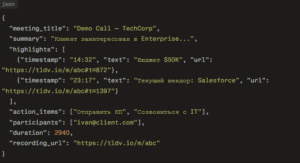
Make and Zapier pass this payload to Kommo as plain text:
- ❌ Timestamps are lost — no clickable links to video moments
- ❌
action_itemsend up in the note text instead of creating Tasks - ❌
highlightsare merged into a single paragraph without structure - ❌ No conditional processing logic
- ❌ No identification of the correct lead when multiple active deals exist
What the Custom Integration from Exceltic.dev Solves
- Timestamps as clickable links — each highlight from the meeting is written to the lead card note as a clickable link to the specific moment in the video with a description
- AI summary with formatting — a structured meeting summary appears in the lead card with sections: overview, key topics, timestamps, next steps
- Action items → Tasks in Kommo — each action item creates a Task in the lead card with a deadline and assignment to the responsible manager
- Link to the full recording — a direct link to the meeting video in tl;dv is written to a custom field of the lead card
- Meeting duration — recorded in a custom field for pipeline stage analytics
- Automatic contact creation — new meeting participants who are not in Kommo are created as contacts and linked to the lead
- Conditional logic — based on keywords in highlights and the summary, rules are applied: a competitor is mentioned → tag
Competitive deal, a budget is mentioned → update theBudgetfield, a short meeting under 5 minutes → do not sync - Internal meeting filtering — meetings where all participants are from the corporate domain are automatically excluded from sync
- Team sharing — when a lead is handed off to another manager, the new owner receives a notification with a link to the meeting recording
How the Integration Works — Technical Process
Connection Architecture
The integration is built on the tl;dv Webhook → Exceltic middleware → Kommo API v4 stack. After processing the recording, tl;dv sends a webhook with the full meeting payload. Authentication with tl;dv is via API Key. Authentication with Kommo is via OAuth2 Long-lived Token. The middleware uses the tl;dv Make module as an alternative trigger when needed.
Step-by-Step Scenario: Demo Call Completed
- The meeting in Zoom/Google Meet ends — tl;dv processes the recording
- After 10–20 minutes, tl;dv sends a webhook with the full payload
- Middleware parses the structure: summary, highlights with timestamps, action items, participants
- Filtering: participant domains are checked — if all are internal → skip
- Lead identification: search by the external participant’s email in Kommo:
GET /api/v4/contacts?query={email} - Find the contact’s active lead:
GET /api/v4/leads?contact_id={id}&status=active - A formatted note with timestamps is created:
POST /api/v4/leads/{id}/notes - Tasks are created from
action_items:POST /api/v4/tasks - Custom lead fields are updated: duration, recording link:
PATCH /api/v4/leads/{id} - Conditional logic rules are applied: tags, field updates, stage change
What Happens on Error
The middleware uses tl;dv’s meeting_id as an idempotency key — each meeting is processed exactly once even on repeated webhook delivery. If the Kommo API is unavailable, the event is saved to a queue with exponential backoff and processed when availability is restored.
Real-World Case
SaaS company, 4 sales managers, ~50 demos per month, active deal handoffs between managers.
The company used tl;dv to record all demos. The main pain point was context transfer when changing managers: when a deal moved from one manager to another, the new manager spent 20–30 minutes getting up to speed — reading the Kommo conversation history, listening to the tl;dv recording, searching for key moments. At a high deal-closing pace, this accumulated into hours of lost time.
Additionally, the sales director wanted to monitor demo quality without attending every meeting — to check client objections and manager responses. There was no time to watch full recordings.
After connecting the custom integration: every lead card contains timestamps of key meeting moments. When a deal is handed off, the new manager gets full context in 3 minutes — clicking on timestamps to watch only the relevant moments. The director reviews highlights without watching full recordings.
Result: context catch-up time on deal handoffs dropped from 25 to 3 minutes, the director reviews demo quality in 5 minutes per day using timestamps in Kommo, 0 lost action items.
Kommo + tl;dv vs Kommo + Fireflies.ai
Both tools solve the same task — automatically transferring meeting data to the CRM. The difference is in emphasis:
| tl;dv | Fireflies.ai | |
|---|---|---|
| Key feature | Timestamps + video clips | Deep conversation analysis |
| Sentiment analysis | Basic | Detailed |
| Topics detection | Basic | Advanced |
| Business plan price | $59/month/user | $19/month/user |
| Best for | Context transfer, coaching | Conversation analytics, qualification |
tl;dv wins when quick access to specific video moments is important — deal handoffs, manager coaching, async team collaboration. Fireflies wins when detailed analysis of conversation content is the priority.
Which Businesses This Fits
The integration is most relevant for B2B sales teams with active deal handoffs between managers — where meeting context is critical for continuing negotiations and timestamps allow getting up to speed quickly without watching full recordings.
Particularly valuable for distributed teams where managers work in different time zones and the director cannot attend meetings — timestamps in the Kommo card provide asynchronous quality control of negotiations.
Frequently Asked Questions
Why is there no native tl;dv and Kommo integration?
tl;dv supports native CRM integrations only on the Business plan and only for HubSpot, Salesforce, and Pipedrive. Kommo is not on that list. For all other systems, tl;dv provides a Webhook and a Make module. The Exceltic.dev custom integration uses these tools to transfer the full data structure including timestamps.
Are clickable timestamps preserved in Kommo?
Yes. Each highlight from tl;dv contains a direct URL link to the specific moment of the video in the format https://tldv.io/m/{id}#t={seconds}. The custom integration writes these links to the lead card note as clickable elements. The manager opens the card and clicks on the desired moment directly from Kommo.
How does the integration distinguish client meetings from internal meetings?
A filter by participant domains is configured: if all participants have the corporate domain — the meeting is not synced. Additionally, you can filter by meeting name: events containing “Internal”, “Team”, “1:1” in the name are skipped. Only meetings with external participants are pushed to Kommo.
Does the integration work with Google Meet, Zoom, and Teams simultaneously?
Yes. tl;dv supports auto-recording for all three platforms. The webhook fires after processing the recording regardless of the platform. The custom integration handles events from all platforms uniformly.
How long does development of the tl;dv and Kommo integration take?
Basic integration with summary, timestamps, and action items as Tasks — 2–3 business days. Version with conditional logic, meeting filtering, and automatic contact creation — 4–5 business days. Exceltic.dev determines exact timelines after a technical brief.
If you want meeting timestamps to automatically appear in the Kommo lead card — describe your requirements to the Exceltic.dev team. We will configure the data transfer to match your pipeline structure.